How to replace the optical port on a switch
To replace an optical module on a switch safely, always follow ESD precautions, remove fiber cables carefully, and insert the new module with proper alignment until it clicks.
Safety Precautions
- ESD Protection: Wear a grounded anti-static wrist strap or ESD gloves and work on an ESD-safe mat to prevent electrostatic discharge that can damage the module or switch port .
- Laser Safety: Modern Class 1 optical modules are eye-safe, but avoid looking directly into the fiber ends .
- Clean Environment: Work in a dust-free area and keep dust caps on modules and fiber connectors until ready to connect .
Removing the Old Optical Module
- Power Considerations: While SFP modules are hot-swappable, it is recommended to disable the switch port in software to prevent link flapping and network disruption .
- Disconnect Fibers: Release the locking clip on the fiber connector and gently pull out the fiber. Avoid excessive force to prevent damage .
- Cover Ports: Place dust caps on the switch port and the removed module to prevent contamination .
- Release Module: Disengage the latch or bail-clasp mechanism and pull the module straight out, holding it by the edges and avoiding contact with the optical bore or electrical contacts .
- Store Safely: Place the removed module in an anti-static bag if it will be reused .
Installing the New Optical Module
- Check Compatibility: Ensure the new module matches the center wavelength, type, and standards of the old module and the remote device .
- Inspect and Clean: Remove dust caps and inspect the module and fiber connectors. Clean fiber end-faces with approved cleaners or lint-free wipes and isopropyl alcohol .
- Align and Insert: Match the module's key to the port keyway and slide it straight in. Apply firm, even pressure along the horizontal axis until it clicks or the latch engages .
- Secure Module: If the module has a screw or latch, engage it snugly without overtightening .
- Connect Fibers: Remove dust caps from fiber connectors and insert them into the module bores until they click. Verify that fiber labels match the correct ports .
- Test Connectivity: Power on the port (if disabled) and check link status. If the module does not work, clean the fiber connectors again and reconnect .
Additional Tips
- Do Not Force: If the module does not insert easily, check orientation and alignment; forcing it can damage the port .
- Label Fibers: Always label fibers clearly to avoid misconnection during replacement .
- Regular Maintenance: Periodically inspect and clean optical ports to maintain reliable connections . Following these steps ensures safe replacement of optical modules, protects your switch hardware, and maintains network performance.
 Factory
 Replacing an Optical Module
The CE12800E series switches must use Huawei data center switches certified optical modules. Non-certified optical modules
 Factory
 Trick to replace razer mice optical switch''s : r/MouseReview
Issue is, I know you can''t just replace the switches like that, since well, they are optional and need some special connector or
 Factory
 What is Differences Between Switch Optical Ports and Ethernet Ports
Ethernet ports on switches already integrate Ethernet port modules internally, eliminating the need for optical-electrical
 Factory
 Replacing an Optical Module
Optical modules are electrostatic-sensitive components; therefore, you must take ESD protective measures when replacing optical
 Factory
 Replacing an Optical Module
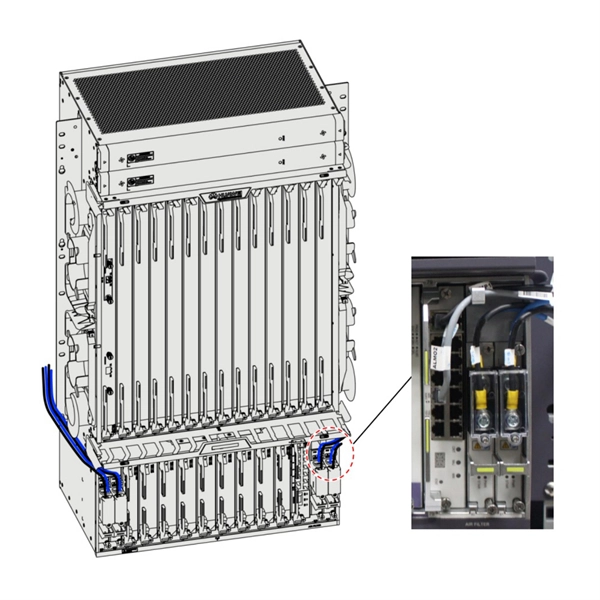
Replacing an Optical Module Context Never look directly into an optical module or the ends of optical fibers. Optical modules and
 Factory
 Pluggable Transceivers Installation Guide
Holding the SFP module by its sides, insert the SFP module into the port on the switch. Slide the SFP module into the port until you
 Factory
 Optical Module Installation and Replacement
Remove the dust plug from an optical port. Keep the dust plug for future use. Ensure that the optical module is correctly oriented and
 Factory
 How to Fix and Replace a Broken Optical Port on Your TV | Expert Q&A
A broken optical port on the TC-P65ST60 can cause unstable cable connections and audio loss. Replacement is possible but
 Factory
 Broken TV Optical Port Workarounds? : r/hometheater
TL;DR: is there any way to workaround a broken optical port to get sound from my TV into my soundbar (optical in only) without
 Factory
 Sonos Playbase Optical Audio Port Replacement
This guide shows how to replace the Optical Audio Port from the Sonos Playbase, which supplies the audio input to the Playbase.
 Factory
 What Is the Optical Audio Port, and When Should I Use
The port is typically labeled "optical audio", "TOSLINK", "Digital Audio Out (Optical)" or
 Factory
 Broken Optical Audio Cable Door “Fix” · The New Leaf Journal
The story of and guide to how I used a sticky note to hold an optical audio cable in place after the optical audio door on my Yamaha
 Factory
 Broken Optical Port, please help
It seems I received a completely diefferent unit back then. My question is for the technical people who know the subject
 Factory
 Installing an Optical Module
This section describes how to install an optical module. The method used to install a copper transceiver module is the same, except
 Factory
 Optical port pulled out from Samsung
I have a 55" Samsung, and while I was readying the TV to relocate, the entire optical jack/port pulled right out. It will
 Factory
 Replacing an Optical Module
Ensure that the optical module is correctly oriented and gently push it into the optical port until you hear a click. The new optical
 Factory
 Broke my optical cable port : r/hometheater
Hello everyone! I was moving my TV today, thought I should save some time and not take my optical cable out of the back of my TV.
 Factory
 How to Install an SFP Module: Step-by-Step Guide
Learn how to install an SFP module correctly with step-by-step instructions, safety tips, hot-swap rules, and troubleshooting for
 Factory
 Replacing an Optical Module
If the LINK indicator on an optical port with two optical fibers is off, swap the two optical fibers. During the replacement, keep the